Showing posts with label symbols. Show all posts

Tuesday, November 12, 2013

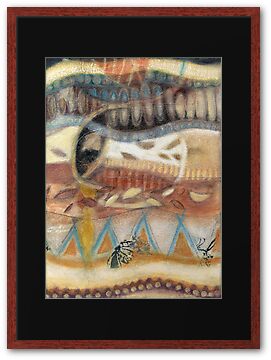
Tropical Fusions - Panels 1 and 2 of 4 total

Tropical Fusions

Is an experimental art ‘potpourri’ work involving techniques of drawing, collage, opaque and transparent painting, layering and then even more overlaying, cutting and dividing.

Mixed-media:pencils – graphite, charcoal, pastel, oil, coloured; soft pastels, impasto gel (acrylic medium), netting, papers – rice, cartridge; natural processed fibres – bagasse (from sugar cane stems); water-based screen-print ink.

Support: 300gsm Arches rag paper, each size 385 × 285 mm
An original sheet size 770 × 570 mm was divided into quarters and each work then laminated onto individual stretched canvases and presented in a single frame format for exhibiting.


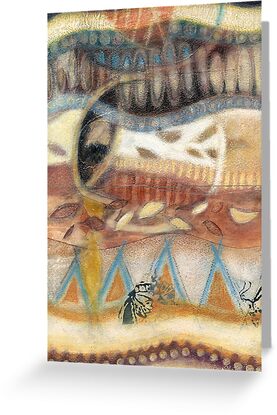
Tropical Fusions (Panel 1 of 4) 

(Image = Bottom left hand side panel of four.)

http://www.redbubble.com/people/artropica/works/11010392-tropical-fusions-detail-panel-1-of-4 

Tropical Fusions (Panel 1 of 4) by ©2013

Tropical Fusions (Panel 2 of 4)

(Image = Bottom right hand side panel of four.)

http://www.redbubble.com/people/artropica/works/11057300-tropical-fusions-panel-2-of-4

Tropical Fusions (Panel 2 of 4) by ©2013


 Original work is:

  • From the Group Exhibition: Cross Currents, 2002, Sugarama Gallery, Mourilyan, QLD.
  • Also Exhibited: 2002-03, Year of the Outback DPI Flying Arts and Selected for Flying Arts TOURING Exhibition Regional Queensland.
  • Currently in the Artist’s Collection.


Inspiration/influences

Overall compositional imagery was inspired/influenced from nature drawing/painting studies direct from my local surrounding Far North Queensland tropical environment such as the capturing of:
  • undulating strata layers, rhythms and patterns from the telling timeline surfaces of palm tree trunks
  • Leaves – both actual and implied: of leaf fall, Native Hibiscus Tiliaceus (cottonwood) dried leaves plus others
  • Palm seeds
  • Butterflies and wings – both actual and implied: of the Cairns Birdwing and other
  • Seasonal atmospheric elements and Moon cycles
  • Earthy oxide palettes – of red iron, Indian red, yellow ochre, white, terra-verte, charcoal and blue – of soils, sands, sky, barks, plants, leaves etc.
  • Vessel shapes based on my own fibre receptacle forms
  • Symbology plays an overall important role in the total work. More info on this can be found at my home website ~ www.kerrynmadsen-pietsch.com


Each of the panel works are being made available as 'prints on demand' for the first time via
my RedBubble Gallery  
 

'Tropical Fusions (Panel 2 of 4)' by ©2013 | RedBubble CARD


Tropical Fusions (Panel 1 of 4) by  ©2013 | RedBubble CARD

Tropical Fusions (Panel 1 of 4) by ©2013 | RedBubble
Sample - FRAMED ART WORK

Tropical Fusions (Panel 2 of 4) by ©2013 | RedBubble
Sample - FRAMED ART WORK


Saturday, October 1, 2011

Symbol Typo's - 'How To' on a Keyboard

I've always wanted to know the 'how to' of typing symbols into the written language for added expression! 

As a person who has had a life time experience of and affinity with the hand making/handling of fine artworks/materials, ie. papers, canvas, textiles, clay, pencils, paintbrushes, paints, glue/collage, needle and thread etc, the art of 'how to', of making the 'expressive' typo language symbols one sees posted in comments made all over the internet these days has always eluded me.  Well, that was until a few months ago when I discovered the following via a 'pointer' seen in a friend's journal discussion.

How to make a typo symbol from your PC keyboard
  1. Hold down the Alt key
  2. + the numbers on the right side of the keyboard. 
ALT+1 ☺
ALT+2 ☻
ALT+3 ♥
ALT+4 ♦
ALT+5 ♣
ALT+6 ♠
ALT+7 •
ALT+8 ◘
ALT+9 ○
ALT+10 ◙
ALT+11 ♂
ALT+12 ♀
ALT+13 ♪
ALT+14 ♫
ALT+15 ☼
ALT+16 ►
ALT+17 ◄
ALT+18 ↕
ALT+19 ‼
ALT+20 ¶
ALT+21 §
ALT+22 ▬
ALT+23 ↨
ALT+24 ↑
ALT+25 ↓
ALT+26 →
ALT+27 ←
ALT+28 ∟
ALT+29 ↔
ALT+30 ▲
ALT+31 ▼
ALT+33 !
ALT+34 “
ALT+35 #
ALT+36 $
ALT+37 %
ALT+38 x%x
ALT+39 ‘
ALT+40 (
ALT+41 )
ALT+42 *
ALT+43 +
ALT+44 ,
ALT+45 -
ALT+46 .
ALT+47 /
ALT+58 :
ALT+59 ;
ALT+60 <
ALT+61 =
ALT+62 >
ALT+63 ?
ALT+64 @
ALT+91 [
ALT+92 \
ALT+93 ]
ALT+94 ^
ALT+95 _
ALT+96 `
ALT+123 {
ALT+124 |
ALT+125 }
ALT+126 ~
ALT+127 ⌂
ALT+128 Ç
ALT+129 ü
ALT+130 é
ALT+131 â
ALT+132 ä
ALT+133 à
ALT+134 å
ALT+135 ç
ALT+136 ê
ALT+137 ë
ALT+138 è
ALT+139 ï
ALT+140 î
ALT+141 ì
ALT+142 Ä
ALT+143 Å
ALT+144 É
ALT+145 æ
ALT+146 Æ
ALT+147 ô
ALT+148 ö
ALT+149 ò
ALT+150 û
ALT+151 ù
ALT+152 ÿ
ALT+153 Ö
ALT+154 Ü
ALT+155 ¢
ALT+156 £
ALT+157 ¥
ALT+158 ₧
ALT+159 ƒ
ALT+160 á
ALT+161 í
ALT+162 ó
ALT+163 ú
ALT+164 ñ
ALT+165 Ñ
ALT+166 ª
ALT+167 º
ALT+168 ¿
ALT+169 ⌐
ALT+170 ¬
ALT+171 ½
ALT+172 ¼
ALT+173 ¡
ALT+174 «
ALT+175 »
ALT+176 ░
ALT+177 ▒
ALT+178 ▓
ALT+179 │
ALT+180 ┤
ALT+181 ╡
ALT+182 ╢
ALT+183 ╖
ALT+184 ╕
ALT+185 ╣
ALT+186 ║
ALT+187 ╗
ALT+188 ╝
ALT+189 ╜
ALT+190 ╛
ALT+191 ┐
ALT+192 └
ALT+193 ┴
ALT+194 ┬
ALT+195 ├
ALT+196 ─
ALT+197 ┼
ALT+198 ╞
ALT+199 ╟
ALT+200 ╚
ALT+201 ╔
ALT+202 ╩
ALT+203 ╦
ALT+204 ╠
ALT+205 ═
ALT+206 ╬
ALT+207 ╧
ALT+208 ╨
ALT+209 ╤
ALT+210 ╥
ALT+211 ╙
ALT+212 ╘
ALT+213 ╒
ALT+214 ╓
ALT+215 ╫
ALT+216 ╪
ALT+217 ┘
ALT+218 ┌
ALT+219 █
ALT+220 ▄
ALT+221 ▌
ALT+222 ▐
ALT+223 ▀
ALT+224 α
ALT+225 ß
ALT+226 Γ
ALT+227 π
ALT+228 Σ
ALT+229 σ
ALT+230 µ
ALT+231 τ
ALT+232 Φ
ALT+233 Θ
ALT+234 Ω
ALT+235 δ
ALT+236 ∞
ALT+237 φ
ALT+238 ε
ALT+239 ∩
ALT+240 ≡
ALT+241 ±
ALT+242 ≥
ALT+243 ≤
ALT+244 ⌠
ALT+245 ⌡
ALT+246 ÷
ALT+247 ≈
ALT+248 °
ALT+249 ¨
ALT+250 ·
ALT+251 √
ALT+252 ⁿ
ALT+253 ²
ALT+254 ■
ALT + 0156 ™
ALT + 0174 ®
ALT + 0169 ©

Collective summary of other useful tips and tricks for symbols found via discussions

→ More options are available by hitting the numbers (ie. number key area on RHS of key board) more than once ... eg. to get the smiley face Ü - press Alt +666  * Note you get the same result by Alt +154
Experiment is what I say!

More can be found via
(PC) Start/Accessories/System tools/Character map/select a font/select a character (with double click)/copy and paste where required, for example: ╔╩╦╬══╦╩╣
(There’s a little program on all versions of Microsoft Windows called Character Map, that includes Foreign languages plus all the above symbols and many others with their descriptions. You can also just put “Character Map” in the 'search' box to open that program.)

For Mac's
Mac's have many symbol options to choose from too:
Press the 'Option' Key and run through the keyboard for these:
`¡™£¢∞§¶•ªº–≠œ∑´®†¥¨ˆøπ“‘«åß∂ƒ©˙∆˚¬…æΩ≈ç√∫˜µ≤≥÷  
Press the 'Shift' and 'Option' Keys, for these:
`⁄€‹›fifl‡°·‚—±Œ„´‰ˇÁ¨ˆØ∏”’»ÅÍÎÏ˝ÓÔÒÚÆ¸˛Ç◊ı˜Â¯˘¿

In Firefox browser ~ Click on Edit > Special characters (and within that box) > Miscellaneous (where others symbols including a heart appears)  > on the heart > insert and voila …♥♥♥

Small Laptop Options
→ Go to: all programs/accessories/character map, then copy and paste!
→ Use the “Number Lock” key in order to gain access to the virtual number pad.
(Most laptops should have this functionality.)  Once accessed the “Number Lock”, proceed with the holding of “ALT” while typing the numbers corresponding for the required symbol.


* All very useful to know when one or more buttons on your keyboard decides to malfunction, such as the 'Semicolons' one  ; :  has on mine.  ; \ 
   
I hope you enjoy them as much as I do.
With available options we can all add a little spice to our comments and replies.
 
♥ the ☼
♥ music notes ♪ ♫ too!!

Even with all these pointers however there is still one quandary I have. How does one post things 'upside down'?"  Ö¿Ö

I just searched in Google ... one answer is http://www.en.fliptext.net/
/ʇǝu˙ʇxǝʇdılɟ˙uǝ˙ʍʍʍ//:dʇʇɥ ɹǝʍsuɐ ˙˙˙ ǝlƃooƃ uı pǝɥɔɹɐǝs ʇsnɾ ı

My guess there is one for 'mirror imaging' too.
I can do this type of manipulation in Photoshop though, in more creative ways!
And so it goes on and on ...

Time to go.
Until next post, it's bye for now!  *waves*  (Sorry, no 'animation' quick post here! *sigh*)

PS. After all this, I desperately need a visual pic hit, so here is one of my older works, reflective of the journey/s of all the bits and pieces we gather, process, compile and finally output/express in a form for the rest of the world to see and interpret!


Pathway of Journeys ©Kerryn Madsen-Pietsch
Thanks for visiting.